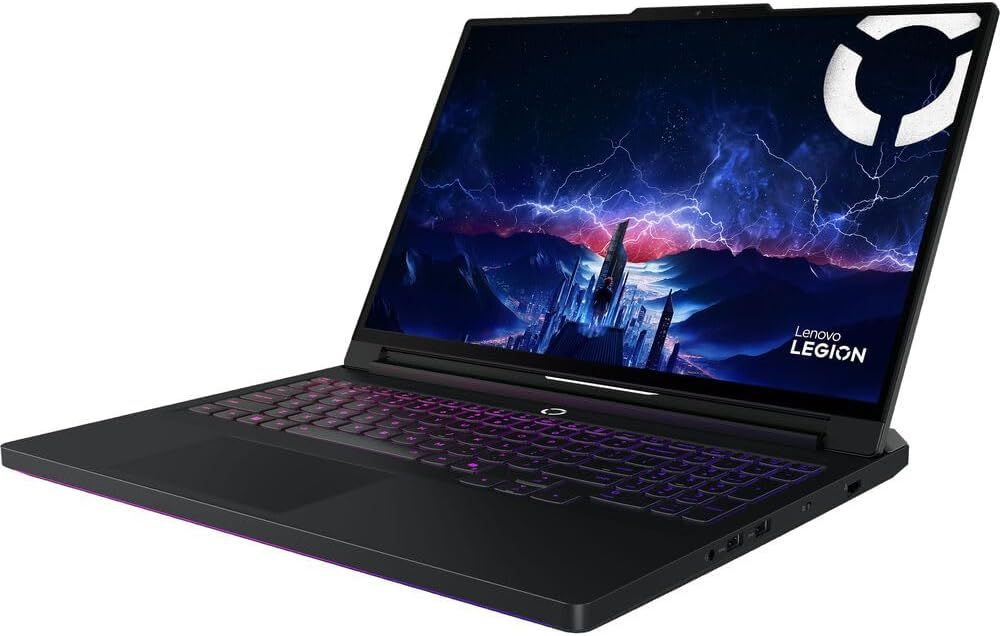
Today I’m excited to present an article about the Legion Pro 7i Gen 10 gaming laptop, which is currently one of the best value options out there. Even though it comes with the most powerful laptop GPU on the market, you can still find it for around $3700 instead of the $4000+ that laptops with these specs usually cost.
Before getting into details, there’s something important to keep in mind. Even if you’re buying a powerful laptop for work or gaming, the performance difference between a laptop RTX 5090 and a desktop RTX 5090 is huge.
Why is a laptop RTX 5090 less powerful than a desktop RTX 5090?
This mainly comes down to power consumption. The laptop version is limited to about 175W, while a desktop RTX 5090 can draw up to 575W. Supplying that much power in a laptop simply isn’t realistic.
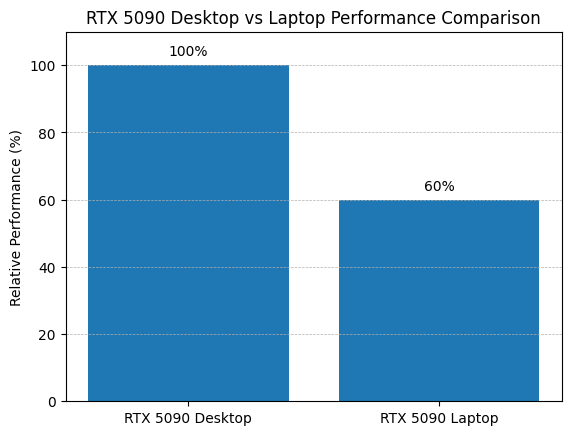
On top of that, laptop versions also have thermal and space limitations, so they run at lower clock speeds and sometimes with fewer active cores.
In reality, modern GPUs are designed with specific versions optimized for laptops, so it’s not entirely fair to compare them directly to desktop models. Still, it’s important to understand these technical differences.
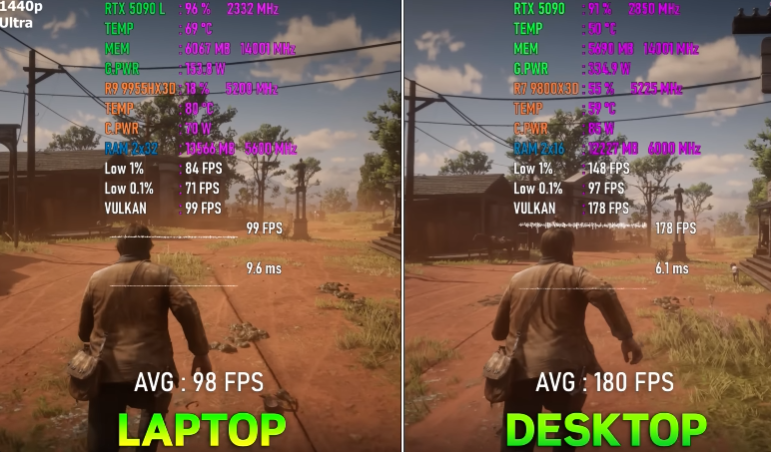
Here’s an example to show the FPS difference between a laptop and desktop RTX 5090. In Red Dead Redemption 2 at ultra settings and 1440p, a laptop averages around 98 FPS, while the desktop version nearly doubles that, reaching about 180 FPS.
If you ask me, calling them by the same name isn’t entirely accurate, but that’s partly marketing. Saying a laptop has an RTX 5090 sounds a lot more impressive than calling it something like “RTX 5090 Lite.”
Going back to the Lenovo Legion Pro 7i, it’s a solid laptop for students, professionals, or gamers who want raw power to run any program or game without issues.
What components does the Lenovo Legion Pro 7i include?
- Processor: Intel Core Ultra 9 275HX
- Operating System: Windows 11 Home (64-bit)
- Graphics Card: NVIDIA GeForce RTX 5090 (24 GB GDDR7)
- RAM: 64 GB DDR5 (2×32 GB, 6400 MHz)
- Storage: 2 TB SSD (2×1 TB, PCIe Gen4)
- Display: 16" OLED WQXGA (2560×1600, 240 Hz)
- Camera: 5 MP with electronic shutter
Basically, with this laptop you can run modern AAA games at max settings with high FPS. It’s also capable of handling demanding tasks like complex 3D rendering, 4K and 8K video editing, and even developing projects that use local AI.
Does the Lenovo Legion Pro 7i work for streaming?
Yes, absolutely. It’s powerful enough to game and stream at the same time on platforms like Twitch or YouTube without any issues.
Where to buy it? Available on Amazon here.